
Guides
A free alternative to DisplayFusion window position profiles
DisplayFusion is a long-established multi-monitor tool for Windows, and its window position profiles are one of the reasons people install it. If you only need to save and restore where your windows are, or you want a free tool to try alongside it, WindowLayout is worth a look. This page is an honest comparison: what DisplayFusion is known for, what WindowLayout covers, what it does not do, and how to move your layouts across. WindowLayout is an independent project and is not affiliated with Binary Fortress Software.
-
Start with what DisplayFusion does well
DisplayFusion offers a broad set of tools: multi-monitor taskbars, window position profiles, triggers, scripted functions, remote control from a phone, wallpaper management and much more, with a free edition and a paid Pro license. Check the Binary Fortress website for which features are in which edition, because that changes over time. If you already own a license and use features such as the multi-monitor taskbars, there may be no reason to switch. WindowLayout is aimed at people who mainly want window layouts, zones, display profiles and brightness in a small free app.
-
See what WindowLayout window profiles cover
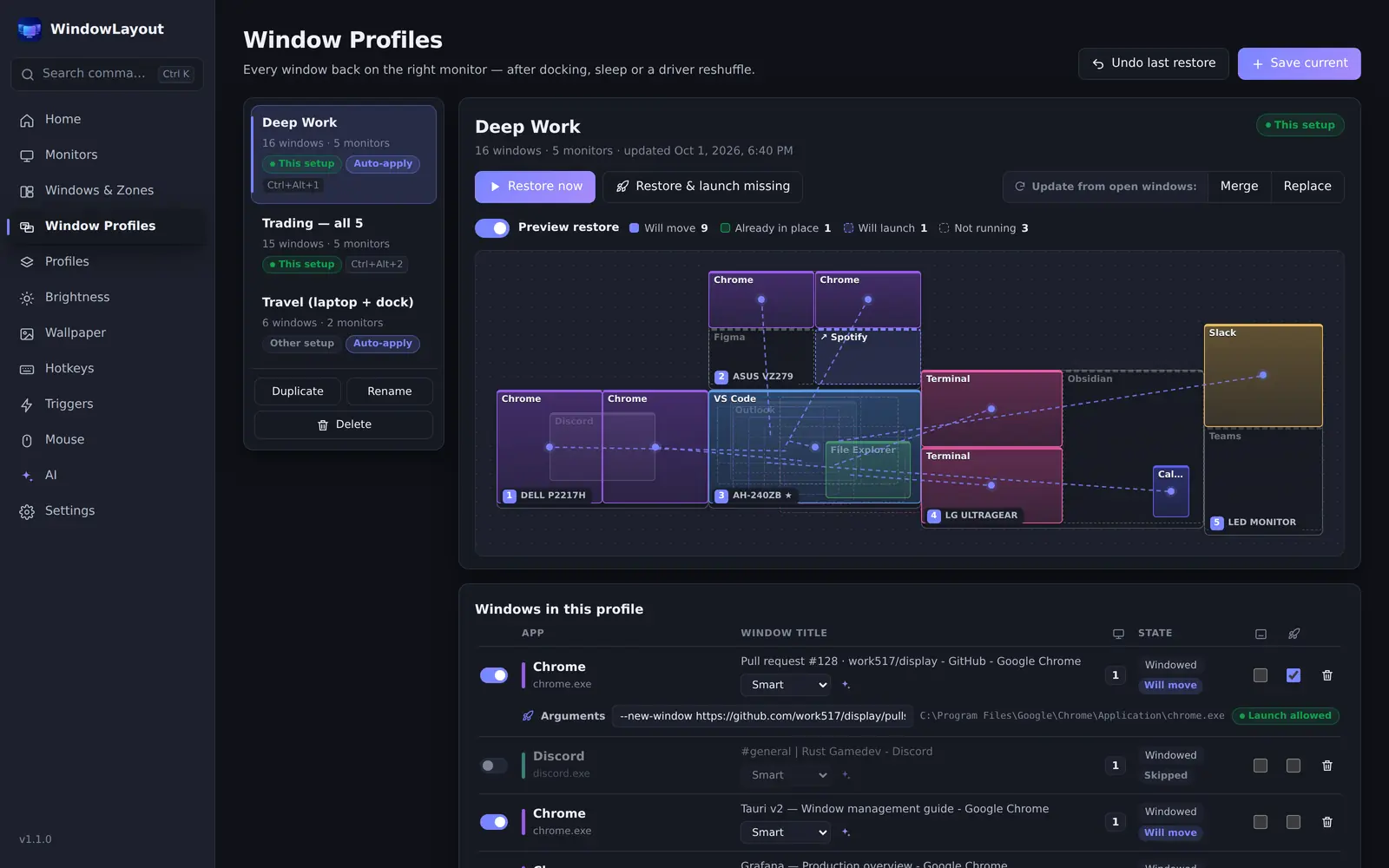
Window Profiles in WindowLayout save every window on every monitor with its position, size, state, stacking order and always-on-top flag. Monitors are identified by device and model, so profiles survive reconnects, sleep and renumbered displays. Smart title matching handles changing titles and several windows of the same app. Maximized windows go back maximized on the right monitor, mixed scaling is handled, and there is a Preview restore map and Undo last restore. Profiles can be restored by hotkey, tray, command palette or trigger, applied automatically when a monitor setup connects, and can optionally launch apps you have approved. Automatic snapshots restore windows after sleep and unlock, and Remember app positions reopens apps where they last were.
-
Know what WindowLayout does not do
WindowLayout has no scripting language. Since version 1.5 it does have taskbars on extra monitors (beta) and a phone remote on your local network, both off by default. It cannot import DisplayFusion settings or profiles, so you recreate your layouts, which usually takes a few minutes. Every WindowLayout feature is free, with no Pro edition, no trial and no account, and the app works offline with no telemetry. It runs on Windows 10 and 11 and the installer is about 3 MB.
-
Recreate your profiles in WindowLayout
Install WindowLayout and open Window Profiles. Restore your layout with your current tool one last time, then click Save current and give the profile the same name. Check the Windows in this profile list: set a title rule where needed (Smart, Exact match, Contains, Regex or Any title), and tick Launch if not running for apps you want started, then approve them with Allow launch…. In Profile options, set a Hotkey, choose what happens If a monitor is missing, and turn on Apply automatically when this setup connects if you want it applied on docking.
-
Avoid two tools moving the same windows
If you keep both apps installed while you compare them, make sure only one of them restores windows automatically. Turn off automatic profile loading in one tool, or leave the automation switches in WindowLayout off until you have decided. Otherwise both may react to the same monitor change and move windows twice. Hotkeys can also clash; WindowLayout checks each shortcut as you set it and warns you when another of its actions or another program already uses it, so pick a free combination.
Frequently asked questions
Is WindowLayout affiliated with DisplayFusion?
No. WindowLayout is an independent project. DisplayFusion is a trademark of Binary Fortress Software, and the name is used here only to describe the comparison.
Can I import my DisplayFusion window position profiles?
No, there is no importer. Restore the layout once with your current tool, then save it in WindowLayout with Save current. To move WindowLayout's own settings and profiles between PCs, use Backup & restore, which puts everything in one .wlbackup file.
Is WindowLayout really free?
Yes. All features are free to use, with no Pro version, no trial, no ads and no account. The optional AI assistant is off by default and uses your own key or a local model if you turn it on.
Try it on your own desk
WindowLayout is free, about 3 MB, works offline and has no ads or telemetry. Save your first window layout in under a minute.